
an LLM is a computer program that has been fed enough examples to be able to recognize and interpret human language or other types of complex data.
Many LLMs are trained on data that has been gathered from the Internet — thousands or millions of gigabytes’ worth of text. But the quality of the samples impacts how well LLMs will learn natural language, so an LLM’s programmers may use a more curated data set. LLMs primarily work as sequence-prediction machines, predicting the next word or token based on the provided input text.
The assumption that most people make is that these models can answer questions or chat with you, but in reality all they can do is take some text you provide as input and guess what the next word (or more accurately, the next token) is going to be.
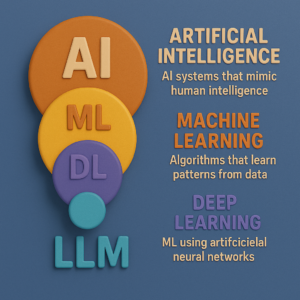
Here’s how an LLM processes and generates text:
- Tokenization: Text is broken into smaller chunks called tokens (words, subwords, or characters).
- Input Embeddings: Each token is converted into a vector representation, capturing its meaning in context.
- Attention Mechanism: The transformer architecture identifies relationships between tokens to prioritize important parts of the input.
- Output Prediction: The model generates the most likely next token, repeating the process to form sentences or responses.
Note: LLMs statistically model word sequences based on their training data; they are not databases of facts.
Some Best LLM Models
1. Gemini
- Developed by Google, Gemini is a family of multimodal LLMs that can process text, images, audio, and video.
- Integrated into many Google applications, it comes in three sizes: Ultra, Pro, and Nano.
- Ultra is the largest and most capable, outperforming GPT-4 on most benchmarks.
- Pro is a mid-tier model, while Nano is designed for efficiency in on-device tasks.
2. Gemma
- An open-source LLM family from Google trained on the same resources as Gemini.
- Comes in two sizes: 2 billion and 7 billion parameters.
- Outperforms Llama 2 models of similar sizes and supports local use on personal computers.
3. GPT-3
- Released by OpenAI in 2020, GPT-3 has over 175 billion parameters and uses a decoder-only transformer architecture.
- Trained on datasets like Common Crawl, WebText2, Books1, Books2, and Wikipedia.
- Exclusive use rights are owned by Microsoft since 2022.
4. GPT-3.5
- A fine-tuned version of GPT-3, using reinforcement learning from human feedback.
- Powers ChatGPT and supports tools like Bing.
- Training data extends up to September 2021.
5. GPT-4
- Released in 2023, GPT-4 is OpenAI’s largest transformer-based model, capable of processing both language and images.
- Known for human-level performance in academic exams, it powers Microsoft Bing and ChatGPT Plus.
- The exact parameter count is undisclosed, but rumors suggest 170 trillion+.
6. GPT-4o (Omni)
- Successor to GPT-4, GPT-4o enables natural, human-like conversations.
- Multimodal and faster than GPT-4 Turbo, with a response time of 232 milliseconds.
- Available for free to developers and customers.
7. Lamda (Language Model for Dialogue Applications)
- Developed by Google Brain in 2021, Lamda is based on a decoder-only transformer model.
- Pre-trained on a large text corpus, it gained attention in 2022 due to claims of sentience.
8. Llama (Large Language Model Meta AI)
- Meta’s open-source LLM released in 2023.
- Comes in sizes up to 65 billion parameters and supports efficient usage on smaller computing systems.
- Trained on data from CommonCrawl, GitHub, Wikipedia, and Project Gutenberg.
9. Mistral
- A 7 billion parameter LLM outperforming similar models like Llama on benchmarks.
- Its smaller size supports self-hosting and business use, with instruction-following capabilities.
Practical Implementation of LLMs with Code
You might think using large language models (LLMs) is complex or resource-intensive, requiring massive datasets, high-end hardware, and specialized expertise. However, that’s not entirely true! Thanks to the availability of pre-trained models and accessible APIs, leveraging the power of LLMs has become easier than ever.
In this blog, we’ll explore how you can quickly get started with an LLM without worrying about training your own model. We’ll use Gemini LLM as an example to demonstrate how simple it is to integrate an LLM into your applications.
—————————————————————————————-
Why Use Pre-Trained LLMs?
Training an LLM from scratch requires enormous resources, including:
- Massive datasets (hundreds of gigabytes to terabytes).
- Expensive hardware (GPUs/TPUs).
- Advanced AI/ML expertise.
Instead, pre-trained models offered by various providers (like OpenAI, Google, or Gemini) allow developers to harness the capabilities of LLMs with just a few lines of code by utilizing their API services.
Getting Started with Gemini LLM
Let’s dive straight into the implementation! Below is a simple code snippet to help you start your journey with Gemini LLM:
pythonCopyEdit# Install the necessary libraries
%pip install llama-index-llms-gemini llama-index

# Import the Gemini class from llama_index
from llama_index.llms.gemini import Gemini

# Initialize the LLM with the desired model and API key
llm = Gemini(
    model="models/gemini-1.5-flash",  # Specify the model version
    api_key="Your_API_Key_Here",      # Replace with your actual API key
)

# Use the LLM to generate a completion
response = llm.complete("Write a poem about a magic backpack")

# Print the result
print(response)
Explanation of the Code
- Install Required Libraries:
Install thellama-index-llms-geminipackage, which provides the tools to interact with the Gemini LLM API. - Initialize the LLM:
- Specify the model version (e.g.,
"models/gemini-1.5-flash"). - Provide your API key to authenticate and access the model.
- Specify the model version (e.g.,
- Generate Text with the LLM:
Thecomplete()method allows you to pass any prompt to the model. In this example, we’ve asked it to write a poem about a magic backpack. - Display the Output:
The model generates a response, which you can print or use directly in your application.
As you can see, working with LLMs is no longer a daunting task. With APIs like Gemini LLM, you can get started in minutes and unlock the power of AI in your applications. Whether you’re building a chatbot, generating content, or experimenting with creative writing, LLMs are here to make your life easier.
So, what are you waiting for? Start your LLM journey today!